Working with the Navigation Drawer











Load the Google Android Development Environment
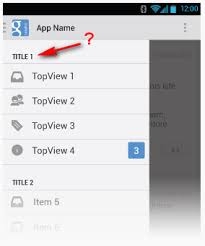
Google UI Guidelines for Navigation Drawer
Example Applications using the navigation Drawer
Creating a Navigation Drawer
- code with sample project and icons
- NavigationDrawer.zip
- Andriod_Navigation_Drawer_Icon_20130516.zip
Other articles related to Navigation Drawer
How to Add icons adjacent to titles for Android Navigation Drawer
Want to Add a Navigation Drawer to Your Android App?
OK, what do I need to test and run this sample project?
Getting Started
Building Your First App
- How do I tell if which SDK I have?
Getting Started with Android Studio
- New Android development environment based on IntelliJ IDEA
- Similar to Eclipse with ADT Plugin
- Integrated Android developer tools
Installing Android Studio v0.1.1
Will this cause any conflict for the Xamarin environment I already have installed?
No problems installing.

Updating to 0.1.3
The Check for updates is at the very bottom of the screen.
Installing some missing things for the SDK. The are not missing on Xamarin Android SDK install.


Error on starting the ADB server.

Updating to 0.1.3
Applying patch
Trying to run my first app from Android Studio
Looking for AD?

Why does it says that the device is offline?
- Because I had not selected the let debug button on the phone.

Android 4.2.2 Jelly Bean

the load status in the very bottom right corner.
Hmmm, the load status says 350M of 711M; however, the app is up and running on the phone.
The source code is a little buried.
Look like this app is for android-syooirt-v4.jar
Little hard to tell what is happening. The Choose Device window pop's up before anything is loaded.
Works like a charm.
Android Tools Projedct Site: Recent
OK, time to try the Navigation Application Sample
Creating a Navigation Drawer
Download sample app

Import the NavigationDrawer Project


Is the something being loaded from NavigationDrawer are something be load to. Let's hope is loaded from.

Nope, I was wrong. This is where it is going to.
Wow, that just failed. Looks like I have to import and save in the same location.


What is the 249M of 711M at the bottom?
- allocated heap size
- found by clicking on the field
coming up in the vertual and not the real thing. Arg!!!!

Waiting for device.
C:\Users\sh25\AppData\Local\Android\android-studio\sdk\tools\emulator.exe -avd AVD_for_Nexus_4_by_Google -netspeed full -netdelay none
Device connected: emulator-5554
Device is online: emulator-5554
Target device: emulator-5554 (AVD_for_Nexus_4_by_Google)
Uploading file
local path: C:\Users\sh25\Downloads\NavigationDrawer\NavigationDrawer\out\production\NavigationDrawer\NavigationDrawer.apk
remote path: /data/local/tmp/com.example.android.navigationdrawerexample
Installing com.example.android.navigationdrawerexample
DEVICE SHELL COMMAND: pm install -r "/data/local/tmp/com.example.android.navigationdrawerexample"
Device is not ready. Waiting for 20 sec.
DEVICE SHELL COMMAND: pm install -r "/data/local/tmp/com.example.android.navigationdrawerexample"
Device is not ready. Waiting for 20 sec.
This is taking forever
Should kill the device and start over?

Work!!!!
Now to get it to run on the phone.
The default configuration was set to use the Emulator and not the USB device.

Has lost a bunch of my images :-(

Looking at the code.
Left side drawer for
- view switches
- selective up
Right side drawer for
- actions, not a navigation drawer
Looking at the code
mDrawerLayout
DrawerLayout
- assigned the DrawerLayout found for R.id.drawer_Layout
What is an IML file?
activity_main.xml
- defines drawer_layout
- match parent for width and height
- Nothing else
Fragments
OnItemClickListener Navigation Drawer
- Use fragment not Activities
Navigation Drawer ActionBar button not working
- forgot to implement the onOptionsItemSelected method
PrashamTrivedi / DrawerLayoutTest
- not really a complete implementation
Android Navigation drawer with actionbarsherlock
- Would havrd
Getting Started - Android Training
Android Application Fundamentals


